Catalog and product photos are placed directly in the ZIP archive.
Guide
How to prepare a ZIP archive with catalog and photos
If product photos should be processed together with the catalog, upload one ZIP archive. It must contain the catalog file in CSV or XLSX format and the images referenced in the catalog.

1
What should be in the archive
The ZIP should contain one catalog file and image files. The catalog may be inside a folder, but placing it in the root of the ZIP is recommended.
- The ZIP contains one CSV or XLSX catalog.
- The catalog has a column with image filenames.
- Image names in the table match files in the ZIP.
- Images are JPG, JPEG, PNG or WEBP.
- The archive does not contain unnecessary system or executable files.
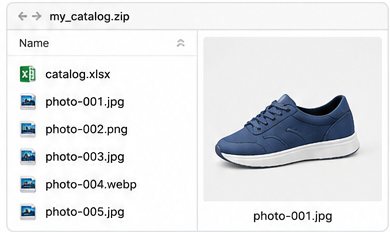
2
Archive structure example

Do not place photos inside another ZIP or hide them in unrelated folders.
3
2. How image names should be written in the table
The catalog should have an image column. It can contain a plain filename or a path with folders. CatalogFix will remove the folders and keep only the filename.
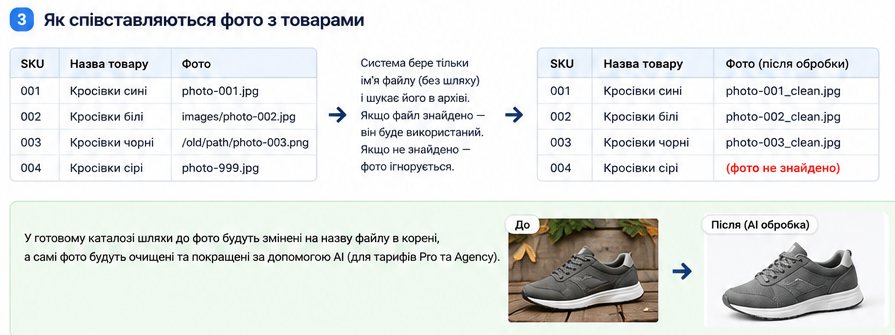
An image is used only when the filename in the table matches a file in the ZIP archive. Files that exist only in the archive are ignored. Files that exist only in the table are ignored as well.
4
6. What you get in the result
Image paths in the final catalog will be cleaned. For example, images/products/photo-001.jpg becomes photo-001.jpg or photo-001_clean.jpg after AI processing. You will also be able to download a separate ZIP with ready product photos.

Important
The more image filenames match the catalog, the more product photos will be processed. Check filenames before uploading the archive.